It looks like your internet connection is lost. Please try after reconnecting.
Information
Close initiated by candidate.
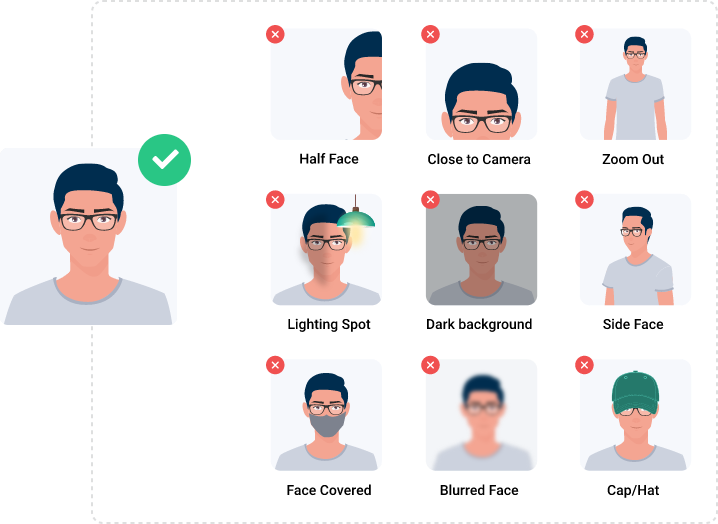
Guidance on Proctoring Gestures & Unfair Means During Exam
Keep your face visible at all times.
Ensure proper lighting in your environment.
Maintain a stable and focused posture.
Avoid looking away from the screen.
Meaning of Unfair Means in Exams
Exam unfair means are any form of cheating or dishonest behavior that gives a candidate an advantage over others, compromising the integrity and fairness of the test.
FNPFace not Present
MFDMultiple Face Detected
FMFace Mismatch
SFLScreen Focus Lost
PRPermission Revoked
ODObject Detected
VDVoice Detected
LALooking Away
VMVoice Muted
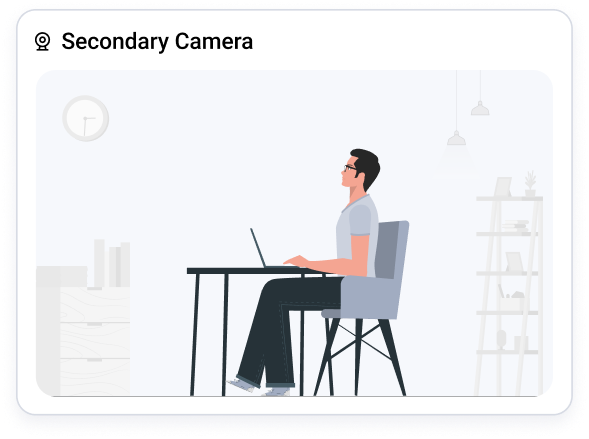
Guidance on Secondary Camera and Seating Instructions During Exam
Secondary Camera should be positioned behind or beside the candidate to capture their surroundings, including the desk and screen, without obstructions.
The camera must remain on and functional throughout the exam.
The chair should be fully visible in the secondary camera feed.
Only one screen is allowed during the exam.
No external devices, such as extra monitors, tablets, or phones, should be connected unless explicitly permitted.
Allow Chromium Access to Proceed with the Exam
Your Windows firewall has blocked some features of Chromium on public and private networks. To continue with the exam, please allow chromium.
INSTRUCTIONSTotal Questions :Total Duration :
Please read the following instructions very carefully: